
Complete Visibility on Day One
Store your organization’s equipment database within Salamander’s secure cloud-based application, SalamanderLive, and gain real-time access to your invested equipment.
All equipment plays a critical role in your operations. By storing essential information within each equipment profile, you ensure the information you need is accurate, current, and accessible when you need it. All activities associated with equipment is logged in real-time, giving you complete visibility of where equipment is located, their status, condition, needed attention, and who has what.


Transparent Visibility
Track equipment across their entire lifecycle while delivering real-time visibility for everyone.
Save Time
Modernize outdated processes and unify every department on a single platform so you can focus on delivering fast, seamless visibility.
Maximize Lifespan
With leadership aligned with your equipment management approach, you gain the visibility needed to extend inventory lifespan and make informed, data-driven decisions.
Stay Organized
Implement structured policies, reduce operational risk, and align efforts with business objectives through a centralized governance approach.
Effortlessly Manage ALL Equipment Without Leaving Your Desk
Salamander brings together everything you need to manage all your equipment in one modern interface - secure, seamless, and built for efficiency.
Maximize Your Invested Equipment
Maintain readiness with clear visibility into equipment availability, replenishment needs, and assignment status
Instantly Locate Equipment
Have location information readily available to easily request equipment, as needed, or view their location on a map
See Personnel Assigned Equipment
As equipment is issued to personnel, see who has what, the quantities on-hand, and when it was assigned to them
Keep Equipment Up-to-Date and Ready
Set and receive alerts when equipment is due to have maintenance, inspections, and other required actions
Ensure Equipment Certifications are Current
Add issue and expiration dates for each equipment to easily track when equipment needs to be re-certified
Leverage a Suite of Reports
Stay informed with a wide range of reports detailing the status of equipment, location, assignment, condition, and more
View All Historical Aspects of Equipment
All notes are preserved for historical reference, along with a full record of equipment activity and usage
Show Deployable Equipment
Mark equipment as deployable, allowing for authorized personnel to view availability and submit requests
Combine Equipment Management with Inventory
Take your equipment management to the next level by issuing and returning equipment to your personnel
Key Features of Equipment Management
Deployable Equipment
Toggle deployable equipment to Account or Organization to ensure equipment is visible to the appropriate users
Audit
Mark equipment accordingly when they need to be included in the auding process
Custom Fields
Create account-specific fields when the information is not already included in the default profile
Reporting
Stay informed with a wide range of reports covering alerts, reordering needs, complete history, and more
Equipment Details
Add comprehensive details to each equipment item, including generic profile data, vehicle details, purchasing info, location and contact data, consumable information, and any custom-defined fields
Equipment TAG
Print a Salamander TAG that can be encoded with data from the entered profile details, including an image, ID, organization name, and expiration date
Actionable Parent / Child Relationships
Easily view and access any parent / child relationships set within an equipment’s profile
Add Files
Upload documents, spreadsheets, and images, and manage each file’s status, category, start / expiration dates, along with an added description
Notes Logs
Create a log of reports and add notes including the users name that added the note, date, and time
Apply Qualifications
Apply qualifications to an equipment item and add a certification, issue / expiration date, upload files, and choose to encode within the QR code
Set Alerts
Add, edit, and complete alert tasks directly within an equipment profile
Maintain Accurate Consumable Counts
Consumable counts update in real-time as items are issued, consumed, and automatic alerts are sent when it is time to reorder
Typically Utilized with Equipment Management

Issue and Return Equipment with
INVENTORY MANAGEMENT
Salamander offers an inventory feature that makes it easy to issue, return, consume, and audit all your inventory, both non-consumable and consumables. The solution provides two interfaces, allowing you to manage processes through SalamanderLive, our cloud-based application, or through our mobile app. Always stay informed of stock levels, generate receipts, set and receive alerts, and much more. With scanning capabilities available in both interfaces, handling inventory becomes fast, accurate, and efficient.
Visibility, Control, & Compliance
Top-down Parent to Child Level Visibility
With Salamander’s organizational hierarchy, administrators can control exactly what level of visibility is required for their Account. When creating users, administrators can assign them to their organization and choose whether they should also see any child organization’s data beneath it. For example, a local organization may only view equipment tied to its organization, while a State‑level account can access equipment associated with the State (parent) as well as all associated organizations (children).
This structure allows visibility to be managed from the top‑down, ensuring that each user sees precisely what they need to make informed operational and business decisions.
Users Provisioned for Equipment Management
SalamanderLive offers role-based permissions for Equipment Management. This controls the user's ability to see specific areas within Equipment Management as well as create, read, update, and delete data. Custom roles can be created / customized based on account.
Deployable Equipment Visibility
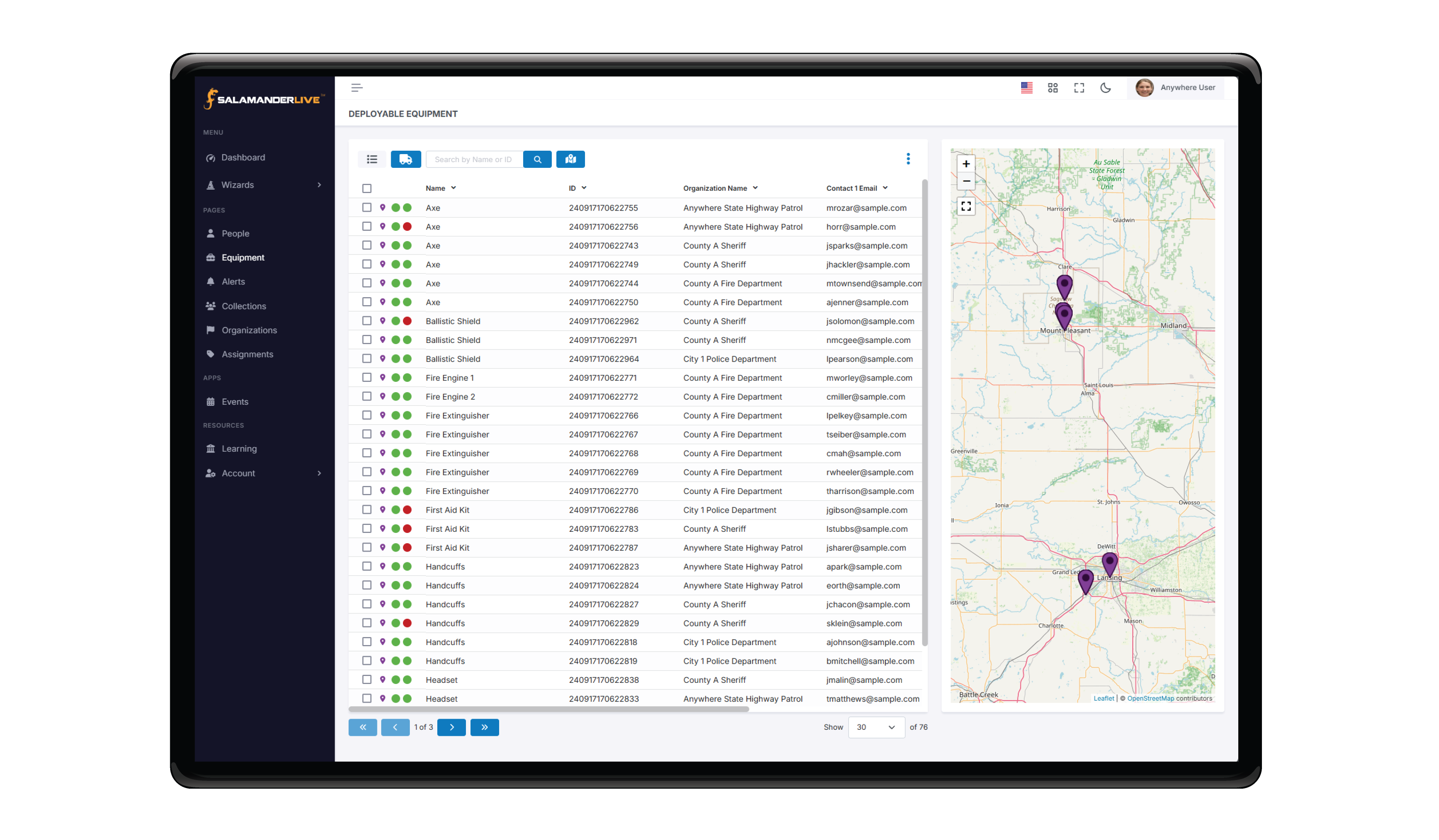
Salamander provides a dedicated interface specifically for deployable equipment. When an event or incident occurs, equipment may need to be deployed quickly, whether they belong to your Organization or within your Account. To support rapid response, the Deployable Equipment toggle lets users easily designate equipment as “Account” or “Organization,” ensuring the right level of visibility.
Users can customize the interface by adding or hiding columns to see exactly the information they need, such as ID, equipment name, address, contact details, and more. All deployable equipment are also pinned on an interactive map, giving you a clear visual of where equipment is located. From the equipment page or map, users can select equipment to view a condensed snapshot of its details. Requesting equipment is fast and straightforward. There is no need to search for contact information or verify availability as everything is visible with one click. Simply choose the equipment you need, and a pre‑populated request form appears with the equipment ID, name, contact details, and a requesting message. Add any additional verbiage necessary and send the request instantly.
PUBLIC SECTOR
Local, State, and Federal government agencies trust Salamander for their equipment tracking needs. Some examples of equipment we track for agencies include:
- POD Equipment (including PPE)
- Safety and Emergency Apparatus
- Weapons and Tactical Items
- Case Files
- Tools
- IT Equipment
- Electric Equipment
- Search and Recovery Gear
- Uniforms and Gear
PRIVATE SECTOR
The private sector of all types (technical, financial, medical, entertainment, and other industry segments) rely on Salamander to meet their equipment tracking needs. Some examples include:
- Computers, Tablets, and Mobile Phones
- Office Furniture and Equipment
- Networking Equipment
- Media
- Medical Supplies (including PPE)
- Documents
EDUCATION
Salamander is used by school districts, K-12, universities, and training institutions. You can track ALL material items for staff, students, and faculty members alike including:
- Computers and Tablets
- Classroom and Staff Furniture
- Classroom Equipment
- Band Instruments
- Gym and Athletic Gear
- Books, Aids, and Library Materials
WOULD YOU LIKE THIS IN A PDF?
Click Here for a PDF on Equipment & Inventory Management

