
Managing resources effectively becomes absolutely essential when an event is underway. Salamander provides a comprehensive suite of tools designed to track and account for every critical resource including personnel, inventory, volunteers, mutual aid partners, patients, and more. Instead of relying on paper worksheets or multiple systems, we provide a digital, interoperable solution that gives real‑time visibility from the moment an event begins until it concludes.
Pre‑planning is just as important as real‑time management, and Salamander equips you with everything required to prepare with confidence. With pre‑credentialing resources and building structured plans, when the call comes in you will be ready to deploy without delay.
Scan Pre-Credentialed Resources
Because your resources are already credentialed, simply scan and add the resource to an event or quickly look them in within the event to add.
RAPID TAG All Non-Credentialed
For anyone who arrives but has not been pre-credentialed, instantly create a RAPID TAG, allowing the tracking of their movements and optionally associate a cost to their activity.
Manage People, Equipment, and Collections in Event
Manage resources in an event manually or by scanning their QR code. Whether using the cloud-based application or the mobile app, all information syncs in real-time ensuring a unified, accurate picture for all.
Interoperable Visibility
Easily track and share event information with other organizations using Salamander. Because the solution is fully interoperable, event data can be merged to create a common operating picture that guarantees complete visibility.
Mass Communicate Directly to all On-Scene
Being able to rapidly send out communication is essential. Quickly access all email addresses from the event roster to compose your email directly in the solution, making it easy to get critical information out fast.
Move Resources within an ICS Chart
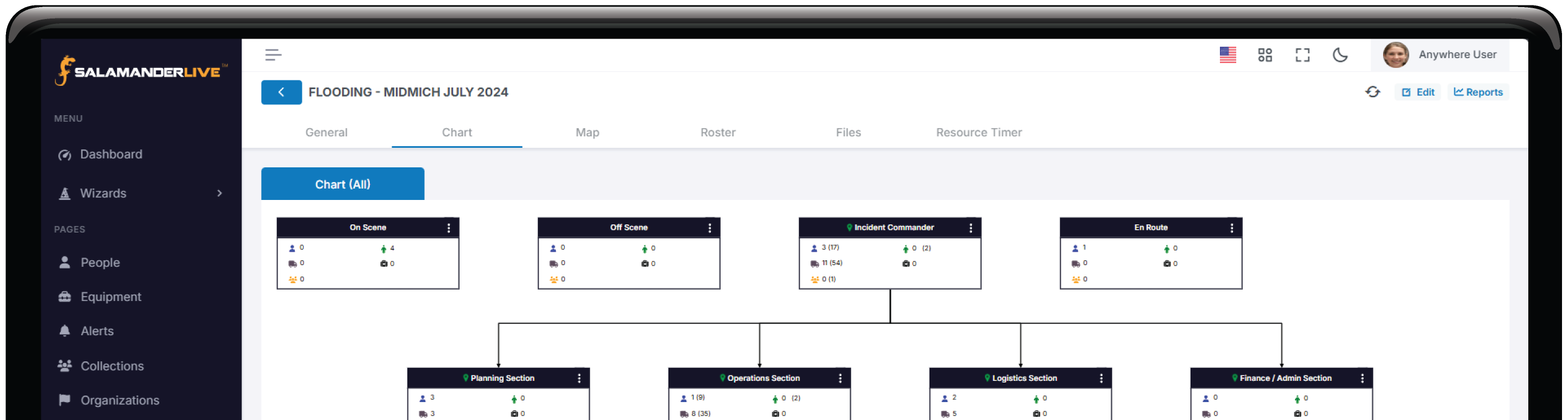
Moving resources from one assignment to another is simple with the ICS chart, which lets you quickly identify a resource’s current location and reassign them as needed.
Resource Locations Displayed on Map
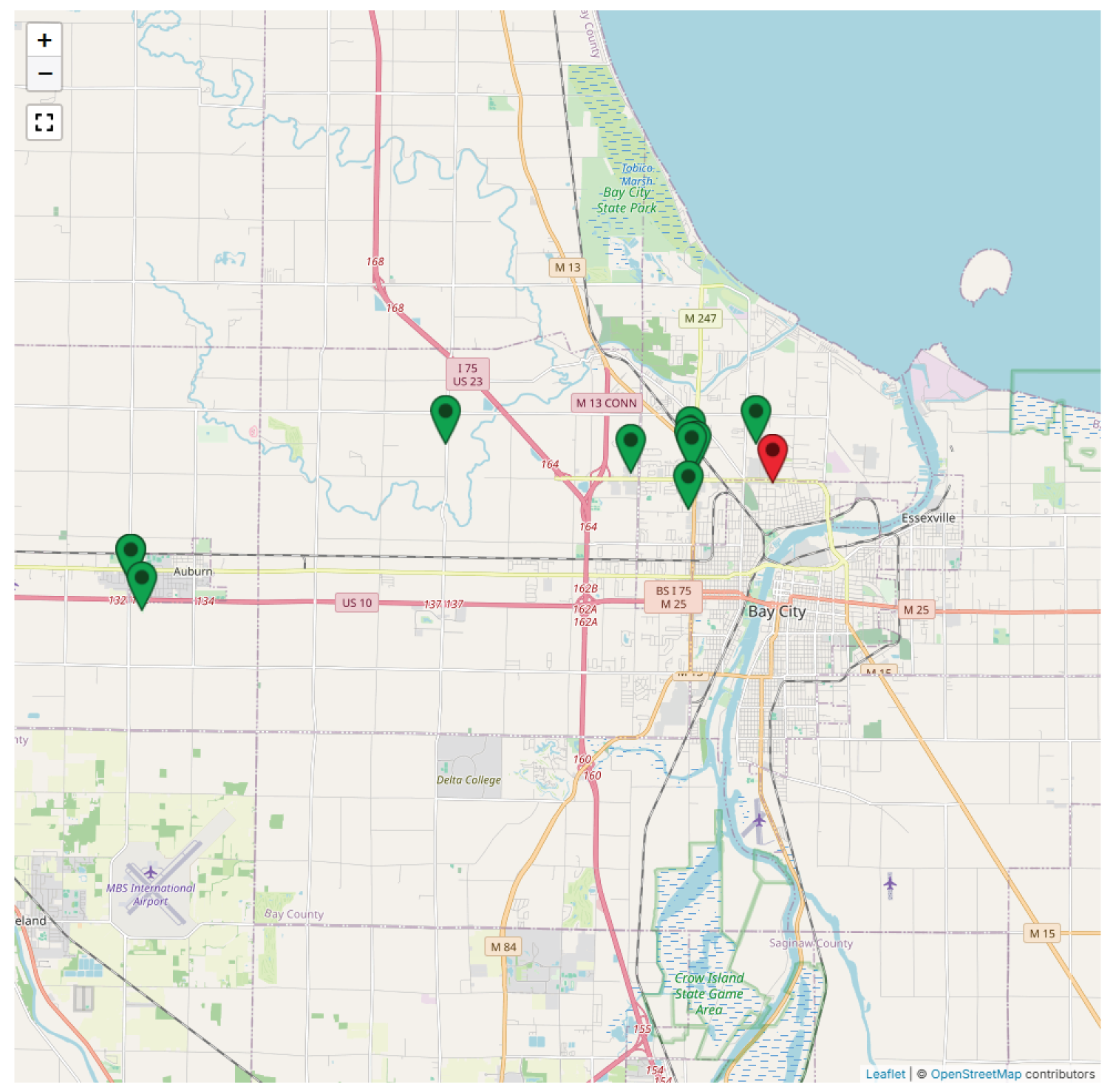
Get a bird’s‑eye view of activity by viewing all assignments, TAG APP users, and TRACK APP users on a single map to help efficiently manage an event.
Triage Patients
For situations requiring triage, RAPID TAG EVAC rapidly produces triage tags that capture important details like the patient’s name, age, and triage level.
Burn Down as Resources Leave the Scene
Maintain accountability through the end of the incident by ensuring all resources are moved off‑scene, which in turn provides accurate burn‑down and estimated event costs.
Report Real-time and After Action
No matter which solutions are used, all information syncs to SalamanderLive providing real-time data for reports at any point during an event.

Burn Down
ICS Chart
Map
Roster
Files
Resource Timer
RAPID TAG
Stats
Accountability at Every Level
Administrative Accountability
From overseeing your organization to managing every critical resource, Salamander empowers you with complete accountability. Track qualifications and training issuance, monitor expirations, and securely store essential documents, all in one place. Move forward with confidence, knowing every detail is managed every step of the way.
Every Day Accountability
Salamander delivers everyday accountability by tracking all resources in one unified system. Equipment and inventory management keep equipment and supplies accurate and traceable, while visitor management logs who enters your facilities. Together, they provide a clear, real‑time picture that strengthens operational control.
Large-Scale Accountability
Salamander delivers end‑to‑end incident management with full resource accountability throughout both planning and live operations. Field‑ready and command‑ready tools give you continuous visibility into who is on‑scene, streamline coordination across agencies, and provide real‑time data to support decisive incident command and accurate post‑event reporting.
Need to Plan for Events?
With Salamander's PLANS Feature, Stage the Event BEFORE it Happens
Have Your ICS Chart already Configured
Build your ICS chart hierarchy by loading each assignment with location details, start date and time, key information, and all associated resources, including personnel, equipment, and collections. Turn your plan into an active event with a click of a button.
See What Resources are Planned to be There
View all planned people, equipment, and collections within the roster. If additional personnel information is needed, easily view contact details, quickly access profile information, and send mass communications.
Send Digital Credentials Before the Event
Send every planned personnel their QR code digitally before the event so they can be scanned and tracked when they arrive on‑scene.
Communicate to Your Planned Roster
Email planned personnel the event‑wide details plus the assignment information for their planned role, including the assignment location and any specific instructions.
Resources Managed in the Incident
People
Beyond your pre‑credentialed personnel, additional individuals such as mutual aid, volunteers, patients, and more can be quickly credentialed and accounted for to ensure complete visibility and accountability.
Equipment
Track the issuance and use of equipment, both non-consumables and consumables, during an incident, including inventory issued outside your organization.
Collections
Create collections that include both people and equipment so they can move through the event as a single unit, with the flexibility to remove resources that were planned for the collection but are not present.
Key Features Used During Incident Management
Two Interfaces to Manage Events
From the field using the TRACK APP to behind the desk with SalamanderLive, you will have the same powerful visibility to easily manage your event from anywhere.
Event Merging
Merge events with other agencies using Salamander’s solutions to seamlessly share information and work together.
Roster
This interactive event resource list enables fast reassignment, mass communication, and easy access to assignments, equipment, and personnel details, including searching for specific qualifications.
Verification Scanning
Scan any personnel, equipment, or collection QR code to instantly view profile images, IDs, statuses, and contact details, making it easy to confirm and verify information.
ICS Charting
Build your event hierarchy in an ICS chart format to manage assignments and resources, view PAR counts, and enhance visibility.
ICS Chart Tabs
Display assignment hierarchies in separate, synchronized tabs to boost visibility and enable management to zero in on specific sections.
Resource Timer
Quickly set timers for personnel during an event and receive an alert when the timer reaches its warning threshold.
Quick Scanning
Scan a resource’s QR code to view its basic information and assignment details, allowing you to add it to an event, confirm its current assignment, or move it to a new one.
Mapping
Gain full visibility into the location of your assignments, TAG APP users, and TRACK APP users with color‑coded interactive pins that display details and optional breadcrumb history.
Rates Tracking
As resources are added to an event, their standard profile rates are applied automatically; if no rate is set, the default account rate is used.
Burn Down
View real-time burn down costs for personnel and equipment to understand event expenses as they occur.
Event File Storage
Store important event‑specific documents, files, and images directly within the event, making them easily accessible to management for use during the operation or after it concludes.
Real-Time PAR Counts
View PAR counts at the assignment level and through the full hierarchical roll‑up, delivering the clarity required for efficient, confident, and controlled operations.
Plan vs Actual
Still managed the same, but with the added ability to view planned personnel separately to track assignment start times, check‑ins, and anyone running late.
CAD Integrations
Integrate your CAD system with SalamanderLive to achieve immediate incident accountability, starting at dispatch and continuing through event creation and real‑time reporting.
Reporting
Real‑time activity logging lets you pull reports whenever needed, giving you an accurate snapshot of the event and all the data required for after‑action documentation.
Full Screen Mode to Display in Incident Command
Switch to full‑screen mode and select the ICS chart, roster, or both in a split-screen layout for maximum visibility.
When Adding the TRACK APP
Mobile Management
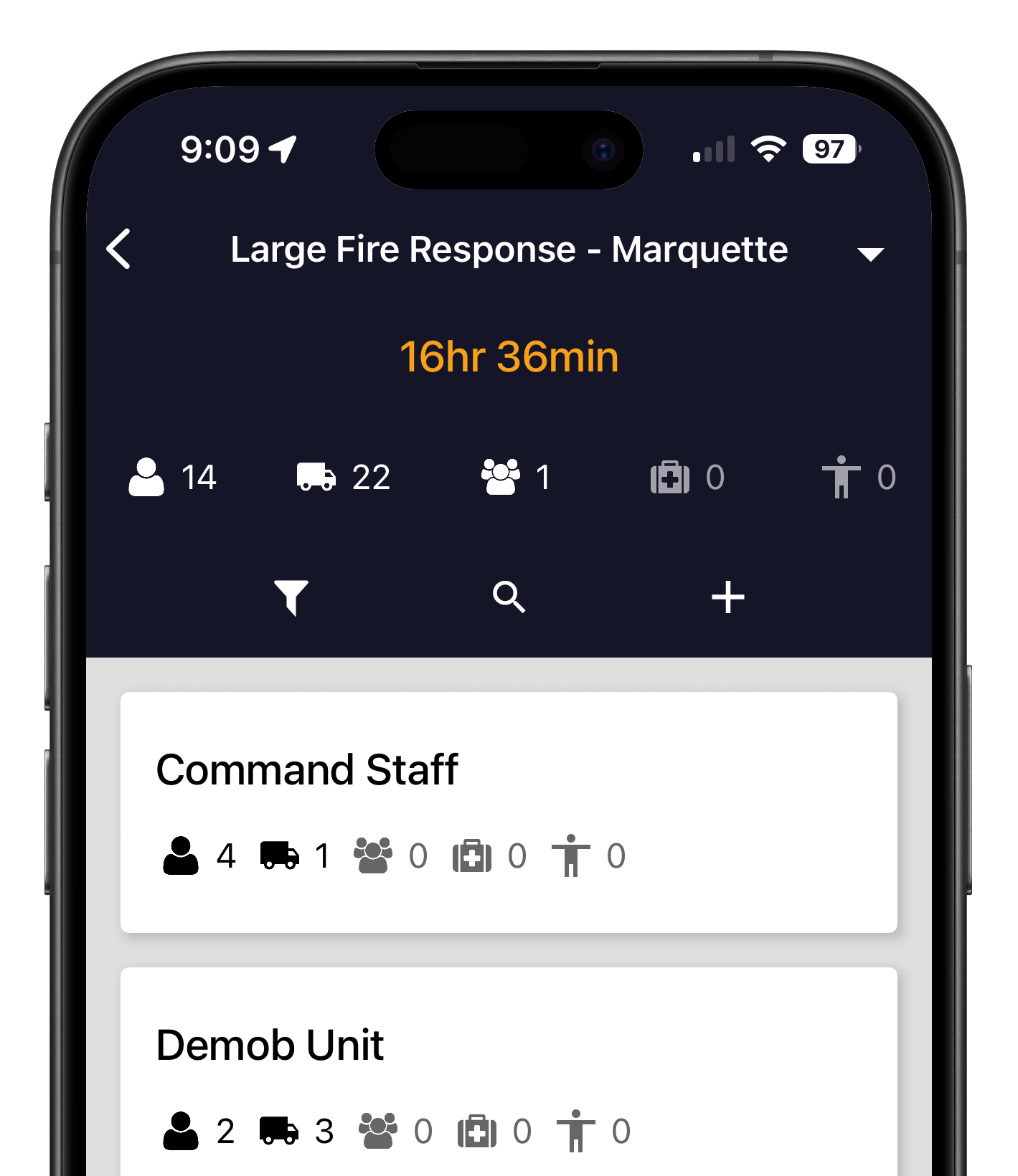
Take incident management into the field with the TRACK APP. All actions sync seamlessly with SalamanderLive, ensuring consistent visibility no matter what interface is used to manage the incident. From the app, start events on the spot and view event-wide and assignment-level PAR counts. Easily scan or manually add and move resources, including assignments, and indicate whether planned personnel check in on time or arrive late.
When Using the TRACK APP
Identity Verification
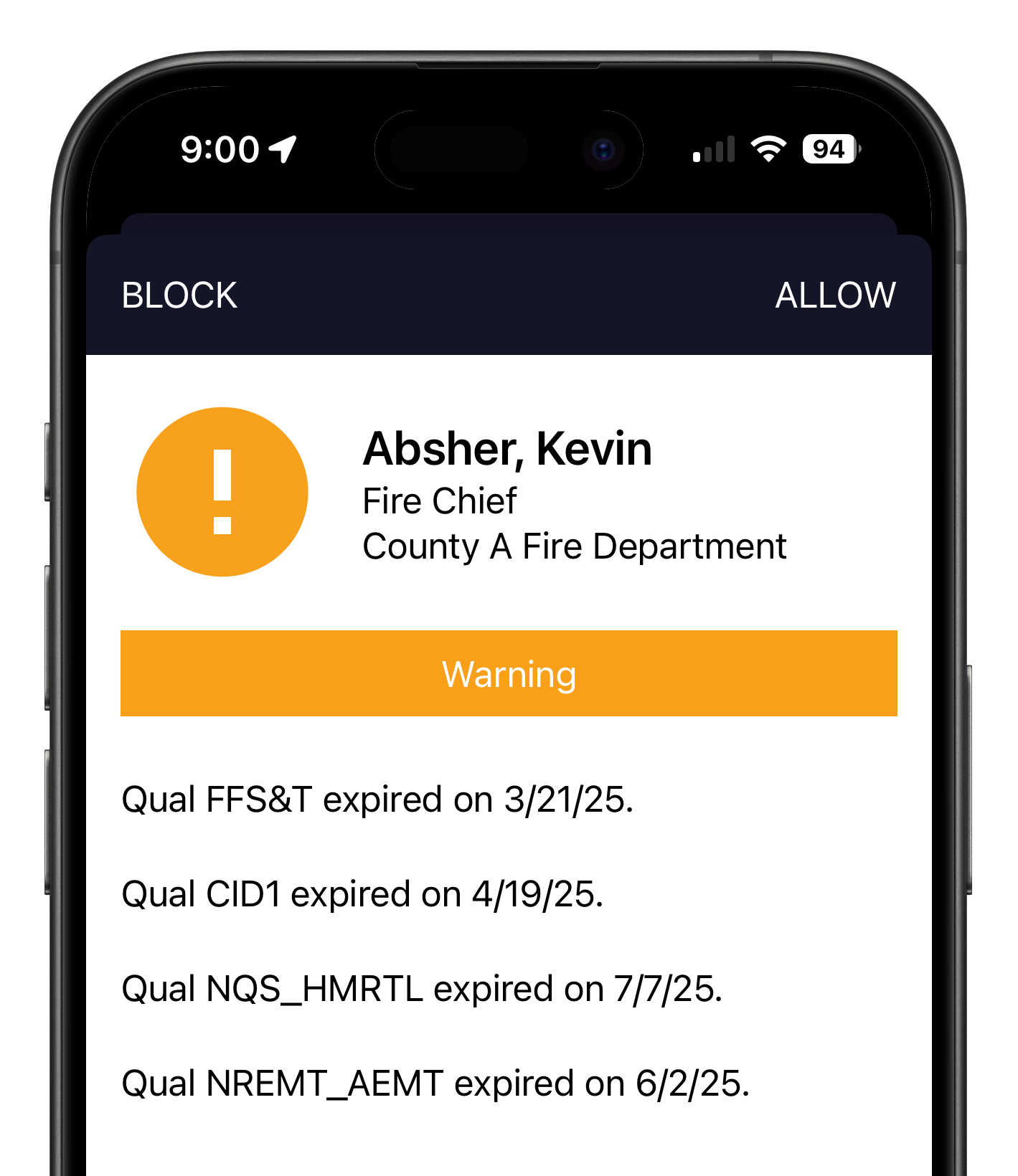
Every TRACK APP scan does a real-time verification with SalamanderLive cross referencing five (5) data points to authenticate the TAG asking the following questions:
- Is it a valid Salamander TAG?
- Is the TAG in an active status?
- Has the TAGs print expired?
- Is it the latest printed TAG?
- Are all qualifications and trainings up-to-date?
When Adding the TAG APP
Real‑Time Resource Location with Historical Tracking
View the real‑time location of TAG APP users as soon as they join an event and are en route to the scene. The event map automatically updates the TAG APP user’s pin, giving you true visibility into their movement and estimated arrival without the distraction of calls or texts. As personnel move, their path is recorded to provide optional historical breadcrumb tracking that can be toggled on or off.
Need a Way to Request Equipment?
Salamander also manages equipment which includes a feature to mark and display all deployable equipment for requesting.
Visibility, Control, & Compliance
Users Provisioned for Incident Management
SalamanderLive offers role-based permissions for Incident Management. This controls the user's ability to see specific areas within the event as well as create, read, update, and delete data. Custom roles can be created / customized based on account.
WOULD YOU LIKE THIS IN A PDF?

